
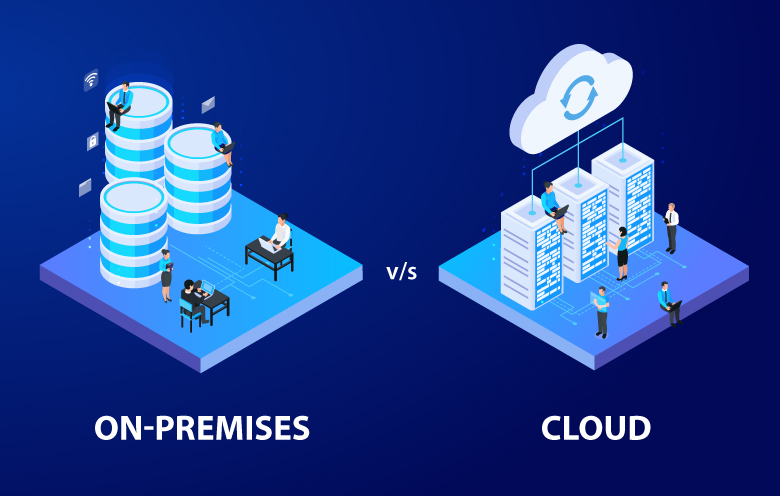
Choosing where mobile application protection should run can shape how a business manages security, infrastructure, and operational responsibilities. A cloud-based service may simplify access and reduce local maintenance, while an on-premises deployment can suit organizations with specific data-location or infrastructure requirements. The right decision depends on more than technical preference.
Compare deployment models carefully first. When comparing mobile app security solutions, teams should consider their compliance obligations, available resources, integration needs, and expectations for managing data. Understanding the differences between deployment models helps decision-makers choose an arrangement that fits their operating environment without assuming that either option is automatically safer.
Understanding the Two Deployment Models
Cloud-based protection uses a provider-managed environment to support tasks such as submitting an application for protection and retrieving the protected build. Teams access the service through its supported tools rather than maintaining the protection environment themselves. This can make evaluation and onboarding easier when internal resources are limited.
An on-premises deployment places the relevant protection environment within the organization’s own infrastructure. This approach can be valuable when internal policies require greater control over where particular operations occur or when external cloud use is restricted. However, the organization must understand the scope of the deployment and the responsibilities it retains.
What Changes Between Cloud and On-Premise?
The core purpose remains protecting applications, but the operating model changes. Cloud services can reduce the need to manage underlying infrastructure, whereas on-premises setups give an organization more direct responsibility for its environment. Neither model removes the need for secure development practices, release checks, access management, or response planning.
1. Infrastructure Ownership
With cloud deployment, the provider operates the service environment used for protection. Internal teams can focus more on application workflows and configuration instead of maintaining the protection infrastructure. On-premises deployment requires planning for hosting, access, maintenance, and the technical environment needed to run the solution.
2. Data Location Requirements
Organizations may have policies that determine where certain data or processing activities can take place. An on-premises setup can help address restrictions on using cloud-based services, but teams should identify exactly which data is involved and where it travels. Deployment location and runtime telemetry routing are separate decisions and should be assessed independently.
3. Internal Skills and Resources
A provider-managed service may be easier for teams that do not have spare capacity to operate additional infrastructure. An on-premises environment can require staff who understand deployment, maintenance, connectivity, and internal controls. Comparison should include ongoing operational effort, not just initial setup.
4. Integration With Existing Systems
Before selecting a model, teams should map how application protection fits into build pipelines, release processes, and internal security tools. Cloud-based workflows may offer a straightforward route for evaluation, while on-premises integration needs to account for the organization’s network and hosting environment. Both approaches should be assessed against workflow requirements.
5. Scaling Across Applications
A business protecting a small number of applications may have different needs from one managing many apps, teams, and release cycles. Consider how new applications will be registered, how configurations will be maintained, and how access will be managed as it expands. Capacity planning should include both technical demands and the people responsible for the process.
How to Evaluate Your Organization’s Requirements
Begin by documenting the reason for considering on-premises deployment. If the main concern is data sovereignty or a restriction on cloud-based services, confirm the policy and determine which processing or telemetry paths it affects. If the goal is simply to improve control, identify the control that is missing from the current workflow before deciding that a new deployment model is necessary.
This is also the point to compare mobile app security solutions against practical operating needs. Review how each option handles app submission, protection configuration, output retrieval, release signing, and threat data. Ask which responsibilities remain with the provider and which must be handled internally. A responsibility map can reveal effort before deciding.
Key Factors That Influence Deployment Decisions
Selecting a suitable deployment model requires businesses to look beyond initial setup and consider how application protection will operate within their existing environment. Evaluating technical requirements alongside internal policies helps teams identify an approach that supports security objectives without creating unnecessary operational complexity.
- Data residency and compliance requirements
- Infrastructure ownership and maintenance responsibilities
- Integration with existing development and release pipelines
- Internal technical expertise and resource availability
- Scalability across applications and development teams
Reviewing these factors together helps organizations understand the practical implications of each deployment option. A clear comparison also makes it easier to identify potential limitations, allocate responsibilities, and choose a setup that fits long-term business and security requirements.
Plan a Proof of Concept Before Committing
A limited proof of concept can help validate the deployment choice before it becomes part of a release process. Provider documentation recommends evaluating the standard cloud setup first, since it can demonstrate the integration flow before the scope of an on-premises engagement is finalized. Teams can use this stage to identify requirements and clarify what needs to change for their intended environment.
The evaluation should cover more than whether a protected build can be produced. Test the workflow from application submission through protection, signing, installation, and release preparation. Confirm how telemetry is routed and which team is responsible for collecting or analyzing it. Record setup effort, dependencies, access requirements, and issues affecting routine releases.
Conclusion
Cloud and on-premises deployment offer different ways to organize application protection, and the best fit depends on an organization’s policies, infrastructure, expertise, and operational goals. Cloud-based workflows can reduce infrastructure responsibilities, while on-premise deployment may suit requirements for greater control over the protection environment. Teams should distinguish deployment location from telemetry routing and evaluate the full workflow before making a commitment.
For organizations seeking flexible application protection, Doverunner provides cloud-based mobile app security and an on-premises deployment option for enterprise requirements. Its documented workflows support Android protection through APK or AAB submission, while iOS protection can use an SDK integrated into the build. By evaluating requirements carefully and testing the intended process, businesses can select a deployment approach that supports their security goals and operational realities.

